

You cannot make a photograph theft-proof once it is online. A screenshot works on any screen in any browser, and no setting changes that. What you can do is stack defences so that copying is awkward, your ownership stays provable, and anyone who uses your work anyway has somewhere to answer for it.
This is how to protect photos from being stolen online in eight steps, in the order I would set them up on a new portfolio: prove you own the originals, publish a smaller file than the one you keep, mark the public copy, strip location data, control how it is delivered, watch for copies, and know the takedown route before you need it. Most theft happens because a full-resolution file with no mark on it and no contact details attached was sitting in plain sight.
Set the whole thing up once in about an hour, spend ten minutes a month checking, and it holds for years. Reviewed and updated for October 2026.
Table of Contents
- How to Protect Photos From Being Stolen Online: What You Need
- Step-by-Step: eight protection steps, in order
- 1. Keep Proof of Your Original Files
- 2. Choose the Right File for Each Purpose
- 3. Add a Visible Watermark to Public Versions
- 4. Remove or Limit Embedded Metadata
- 5. Control Downloads and Hotlinking
- 6. Publish on Platforms You Can Monitor
- 7. Search for Unauthorized Copies
- 8. Document and Report the Infringing Copy
- Common Mistakes That Make Things Worse
- Frequently Asked Questions
- Conclusion: What to Do First
How to Protect Photos From Being Stolen Online: What You Need
Six things, and only two of them might cost you anything. First, clean access to your originals, including the camera files and the layered working files you edit in. Second, the editing software you already use, since a watermark is a layer rather than a new program. Third, a cloud backup that is not your public gallery, because that backup is what you restore from when something goes wrong. Fourth, a written list of the platforms you publish on, so you know where a complaint actually goes and who the host is. Fifth, a record of copyright ownership: dated originals, the date you published, and receipts for commissioned work. Sixth, ten minutes a month for a reverse image search.
None of that stops a screenshot, and it would be dishonest to pretend otherwise. What it does is change the economics. A marked, downsized file is less useful to a thief, a dated original makes your ownership claim concrete, and monitoring turns a slow problem into something you find in a week rather than a year.
Worth knowing before you start: copyright in your photograph exists the moment you press the shutter, in most countries, with no registration required. Registration later is what unlocks larger statutory damages in the United States, but you can wait for that until you actually have a dispute.
Step-by-Step: eight protection steps, in order
The tactics below are not equal. Some deter almost everyone, some only slow a copier down, and one or two are close to decoration. Here is the honest comparison before the detail.
| Tactic | How well it works | Setup effort | Can it be bypassed |
|---|---|---|---|
| Visible watermark | Strong deterrent | Low, then low per image | Yes, by cropping or retouching it out |
| Downsized public previews | Strong | Low | Yes, they still have the smaller file |
| Metadata scrubbing | Weak on its own | Low | Yes, most platforms strip it anyway |
| Disabling right-click | Very weak | Medium | Yes, in seconds with dev tools |
| Hotlink protection and expiring links | Strong on your own server | Medium to high | Only by photographing the screen |
| Reverse image monitoring | Finds copies late | Low, but ongoing | It does not prevent anything |
| Ownership record plus takedown notice | Strong once you need it | Medium | No, but it takes days |
1. Keep Proof of Your Original Files
Never let the only copy of a file live on the laptop you carry. Keep three: a working drive, an automatic cloud backup, and a dated archive folder you do not reorganise. Do not overwrite camera originals, and save each edit as a new export rather than flattening in place.
Name files so the date is visible, like 2026-03-14-coast-shoot-01, and keep a short shoot log with the date, location, model and property releases, and the licence terms for commissioned work. When a copy turns up somewhere else, this archive is what a platform’s copyright form asks you for: the original file, its capture metadata, and a matching earlier publication date.
How you know it worked: pick any published image, open your archive original, and check that the capture date and file name line up with the date you first posted. If they do not, your record is too thin to rely on.
2. Choose the Right File for Each Purpose
Work in three tiers. The master stays local and is never uploaded. The display copy, in sRGB with a long edge around 2000 to 3000 pixels, is what you sell prints from. The share copy, roughly 1200 to 1600 pixels on the long edge, is what goes into feeds and public previews.
The share copy is deliberately small. It looks sharp on a phone and in a grid, but it enlarges softly and gives away nothing worth stealing. If you post the master because a client wanted more pixels, you have handed over the asset. For social framing and resizing, see how to crop photos for Instagram without losing quality.
How you know it worked: open the exported share copy at 100 percent and keep zooming. It should start to look soft well before you reach the size a print needs.
3. Add a Visible Watermark to Public Versions
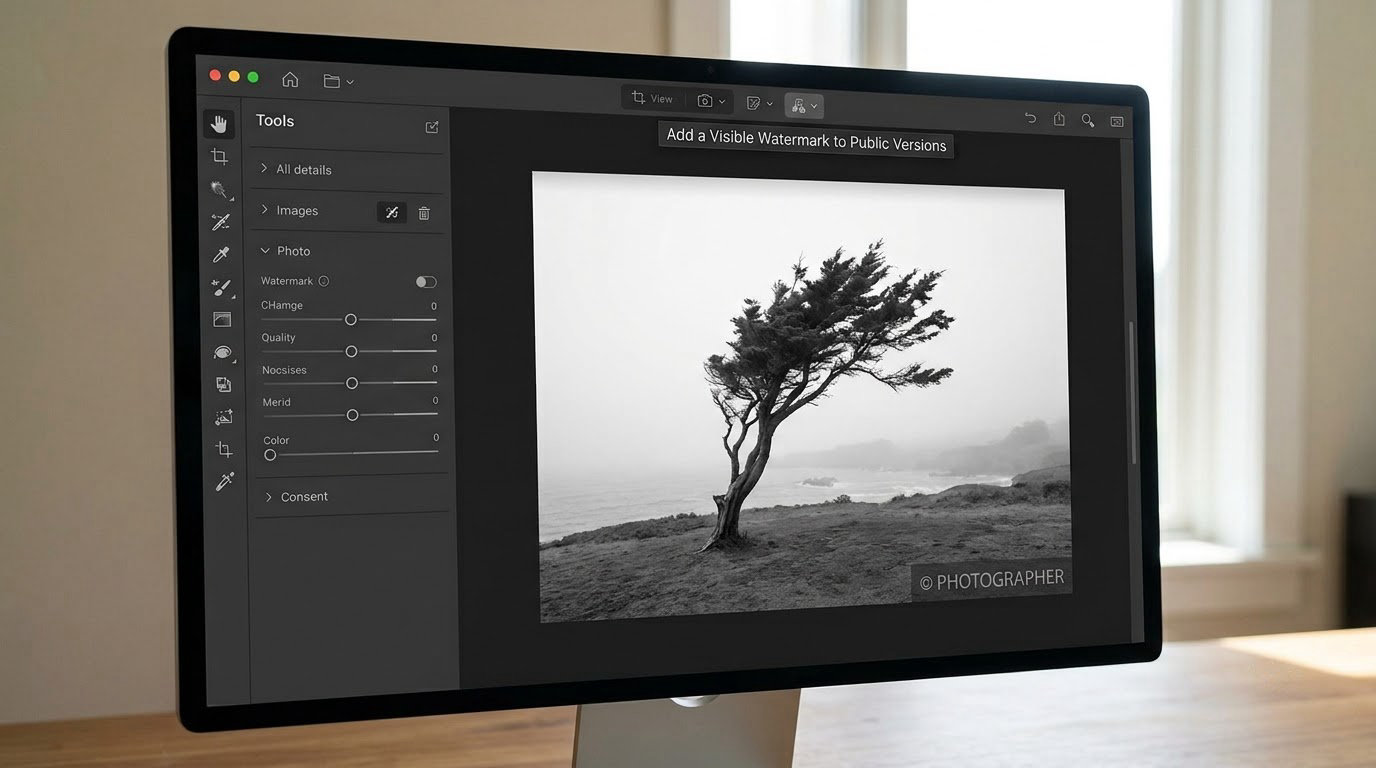
Placement decides how much work the mark does. A centred mark at 30 to 40 percent opacity is the strongest deterrent because the thief has to reconstruct the area behind it. A corner mark suits a portfolio where the image matters more than the threat. A tiled edge-to-edge pattern is the right call for paid galleries and stock previews, where you expect deliberate removal attempts.
On a 1600 pixel wide export, a watermark reading roughly 40 to 60 pixels tall is easy to read in a feed and impossible to ignore. Check contrast against the actual frame: a white mark disappears into a bright sky, so add a soft dark shadow or switch to a dark mark. Export flat, not layered, and keep an unmarked copy only in your own archive.
Verify it twice. At 25 percent zoom the mark should still be readable, which is how a thief will see it first. At 100 percent it should cross the frame without hiding the detail you actually want shown.
The move repeat offenders make is predictable: crop the mark off, then re-watermark your photograph with their own name. A tiled pattern handles that better than a single logo, because there is no clean single edge to cut. For paid work, add an invisible or steganographic watermark to the delivered file so you can trace which buyer leaked it, which is harder to remove because it survives a rescale.
4. Remove or Limit Embedded Metadata
Camera files carry more than people expect. EXIF holds the camera body, lens, serial number, shooting date and often GPS coordinates. IPTC holds the creator name, caption and copyright notice. A geotag on a shot taken at home or at a client’s address is a privacy problem long before it is a copyright problem.
On public copies, strip GPS and device serial numbers. Keep the creator name and copyright notice, either in the IPTC copyright field or as a small visible line, so the file carries a claim even when the platform shows nothing. Do not expect metadata to survive the upload: Instagram and most social apps strip EXIF data before the file is stored, which is why a metadata-only strategy proves little on its own.
In Lightroom, export with Metadata set to Copyright only for the share copy, and keep the full EXIF on your private master. A walkthrough of the export workflow sits in how to color grade photos in Lightroom.
How you know it worked: export to a folder, open the file in any metadata viewer, and confirm the location fields are empty and the copyright field survived.
5. Control Downloads and Hotlinking
Disabling right-click is the weakest tactic in this list. Anyone can open the browser developer tools, read the image address and open it in a new tab, or simply take a screenshot. Treat it as a speed bump for casual visitors and nothing more. Photographers who have tried it usually land on the same conclusion: it is security theatre, because the file is already on the visitor’s machine the moment the page paints.
Better options live on the server side. Hotlink protection rejects image requests coming from other domains, which stops bandwidth theft and keeps your page as the visible source. Signed, time-limited delivery URLs work well for paid galleries: the link expires, so it cannot be passed around indefinitely. Private galleries with a password or per-client download permissions keep client proofs out of open browsing entirely. Disable directory listing as well, so your folder structure is not a map of your archive.
Know the limit of each. Hotlink protection stops other sites re-serving your file. Expiring links stop casual sharing. Permissions stop anonymous browsing. None of them stop someone filming the screen, and pretending otherwise costs you time you could spend on watermarking instead.
6. Publish on Platforms You Can Monitor
Concentrate on a small number of established platforms with real account controls, a documented copyright complaint route and a named host or publisher. Before you commit to one, check whether it has a copyright or impersonation form at all, and how long it takes to answer. A platform with no complaint form means no enforcement, however good the audience is.
Skip unknown image-sharing spaces and open guest albums. Content there is rarely moderated and almost never removed. Publish a small contact page with your name, email and licence terms so that anyone who finds a copy knows where to send credit before they send it somewhere else.
One practical habit: filenames on the public copy should carry your mark, so a leaked file that escapes the platform is still traceable to you.
7. Search for Unauthorized Copies

Run several passes rather than one. In Google Images, use the camera icon to upload the file or paste the address of an image you have already posted. TinEye matches on content rather than keywords and can show you the earliest appearance of a file, which is useful evidence. Yandex Images is often better with cropped fragments.
Search the full frame, a distinctive crop at about half width, and a high-contrast black-and-white conversion. Different versions of the same photograph surface different matches, especially when one copy has been watermarked and another has not. Search the clean archive file too, since that is what finds leaks from before you started marking anything.
Keep one sheet: URL, date found, screenshot, and a note on whether the use looks licensed. Before you call something theft, check whether a platform licence, a model release, or a syndication agreement already covers that use. Getting this wrong turns a quick fix into an argument.
Make it a monthly appointment. The combination that holds up in practice is short and unglamorous: watermark, publish small, and search regularly.
8. Document and Report the Infringing Copy
Capture the evidence before you make contact. You need the full URL, a capture showing the address bar so the page is identifiable, the date and time, a screenshot with the image in context, your original file with its metadata, and the identity of whoever published it, since the host and the publisher are not always the same party.
Add a third-party timestamp while the page still exists. An archive.org snapshot or a dated PDF costs nothing and survives a page that disappears later.
A takedown notice carries six elements. A physical or electronic signature. Identification of the copyrighted work you claim. Identification of the infringing material and where it lives, with enough detail for the host to find it. Your contact details, including an email address, phone number and postal address. A statement that you have a good-faith belief the use is not authorised by the copyright owner, its agent, or the law. A statement, under penalty of perjury, that the information in the notice is accurate and that you are the owner or are authorised to act on the owner’s behalf.
File on the platform’s own copyright form first, since each of the large networks has one and the host is required to act on a valid notice. Publishers pass requests up to the host, which is why identifying the host matters.
Two cautions. Fair use, licensed reuse and some editorial uses exist, so a notice has to be accurate or you expose yourself to liability. And filing puts your contact details in front of the infringer, which matters if you work under a pen name; some creators route notices through a registered agent or an enforcement service for exactly that reason.
Expect re-uploads rather than a permanent win. When the same image reappears, escalate to the upstream host or domain registrar with the earlier notice attached. For genuine commercial misuse, take advice from a qualified lawyer, and if you are in the United States, registering the work with the Copyright Office before a dispute is what makes statutory damages available later.
Common Mistakes That Make Things Worse
- Publishing your only high-resolution master. One upload is all it takes. Export a separate share copy and keep the master local.
- A watermark that can be cropped away in one click. Centre it, or tile it across the frame, and check it against the real background of the photograph.
- Relying on disabled right-click alone. It stops nobody who is serious. Spend the same time on hotlink protection instead.
- Claiming ownership with nothing behind it. A copyright claim with no dated original, no earlier publication and no licence terms gets rejected by platforms and ignored by infringers.
- Deleting your evidence early. Snapshot the page on the day you find it. Once it is gone you cannot prove it was ever published.
- Threatening someone before checking the licence. Confirm whether the use was permitted first. A wrong accusation costs you credibility with the platform, which handles the next claim from you more slowly.
One more that is not really a mistake but a cost: watermarks irritate clients who want to print, and gallery clients often dislike marked proofs. The fix is tiering, not picking a side. Mark the preview, deliver the clean high-resolution file only to the person who bought it.
Frequently Asked Questions
Can I really stop someone from stealing my photos online?
No. Once an image is on a screen, a screenshot, a re-photograph or a manual trace can copy it, and no software setting prevents that. What you can do is raise the cost: mark the public version, publish a smaller file, keep dated originals that prove ownership, and monitor so you find copies early. Layered defences deter almost all opportunistic theft and give you a real route to enforcement for the rest.
Should I remove copyright information before uploading photos?
Partly. Strip location data, device serial numbers and anything else revealing, since GPS coordinates on a private or client shoot are a privacy risk first. Keep the creator name and copyright notice in the IPTC fields or as a visible line, so the file still carries a claim. Expect most social platforms to strip EXIF data anyway, which is why a visible mark and preserved originals matter more than metadata alone.
What is the best way to handle my photo being used on social media?
Start by screenshotting the post with the URL and date visible, then check whether that account has any licence to use it. Report it through the platform’s copyright or impersonation form, which is separate from a general content report. Small platforms answer slower than large networks, so escalate to the domain host or registrar if the post stays up. Expect a re-upload, and keep your evidence for the second round.
Do watermarks prevent photo theft?
They deter it well and block it rarely. A centred mark at 30 to 40 percent opacity, or a tiled pattern across the frame, makes a copy less usable and easier to trace back to you, and most casual reposters skip an image that carries a name. A determined user can crop, retouch or inpaint a mark. So treat watermarking as deterrence plus attribution rather than as a lock, and pair it with downsized publishing.
Do I need to register my photographs before enforcing copyright?
In most countries, including the United States, copyright exists automatically the moment you photograph is fixed in a tangible form, so you can send a takedown notice without registering anything. Registration still matters later: in the US it must be completed before a lawsuit to claim statutory damages, and it carries a filing fee. Register selectively, for work you actively sell or license, and take qualified legal advice before suing anyone.
Conclusion: What to Do First
Protection is layered, and every layer is bypassable on its own. The combination is what works: marked public previews, downsized sharing, clean metadata on your private masters, an ownership record you can produce on demand, and a monthly search that tells you early.
Start with three things this week. Save dated originals and back them up off your laptop. Export a watermarked, downsized share copy and use that for everything public. Then run one reverse image search on your best-known photograph and see what is already out there.